
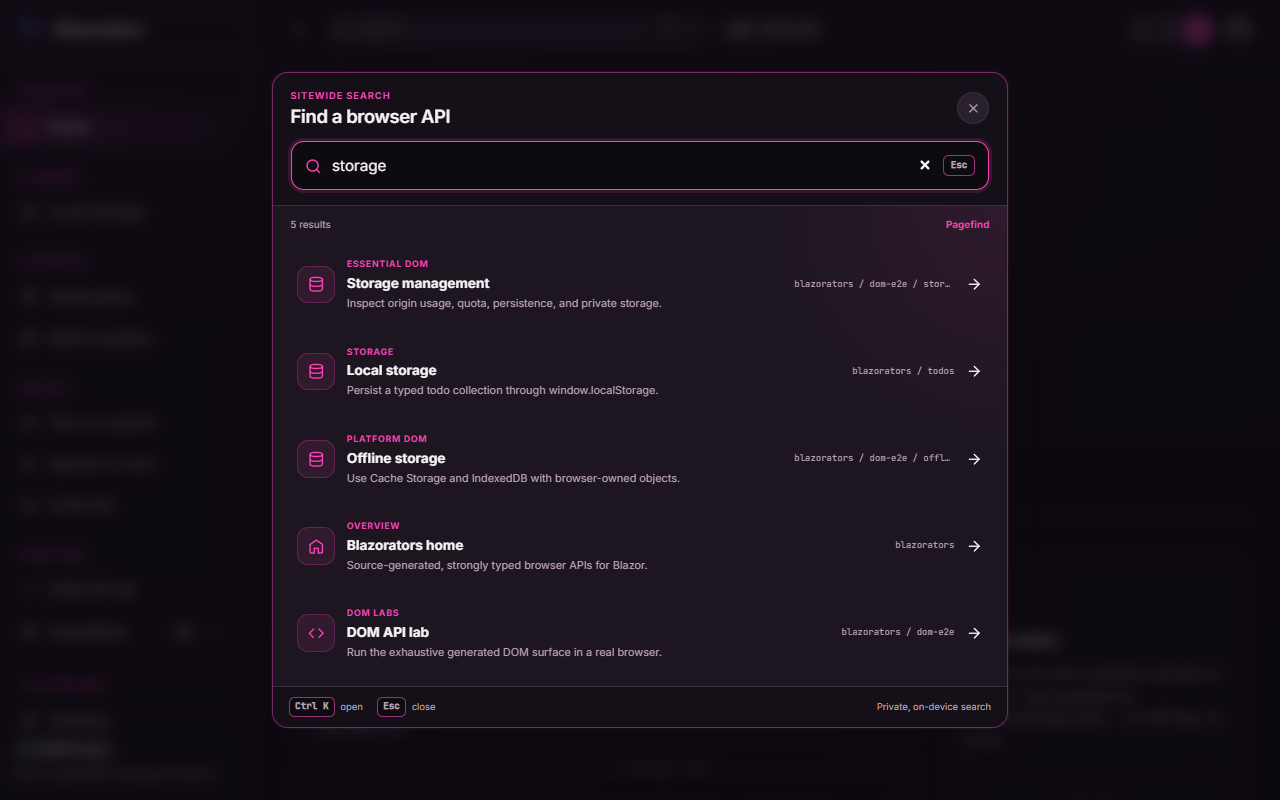
The Blazorators sample app — its live demo site — has quietly turned into a small site. Between the exhaustive DOM interop demos, a catalog of fourteen focused capability packages, the speech and geolocation labs, and the file-preview playground, there are now enough routes that finding the right demo means scrolling. It needed search.
Reaching for Pagefind was the easy part. The interesting part was that Blazorators ships as a standalone Blazor WebAssembly app — and Pagefind was built for static sites. This post is the story of bridging that gap, and a step-by-step guide you can follow for your own Blazor WebAssembly project.
🧭 Why Pagefind
Fun fact: the search box on this very blog is Pagefind too. It was almost effortless here because Astro emits a folder full of static HTML at build time, and Pagefind’s whole model is “point me at your built site and I’ll index the HTML.”
Pagefind is appealing for a client app for the same reasons it’s appealing here:
- It runs entirely on the user’s device — no search server, no API keys, no per-query cost.
- The index is static assets, so it deploys anywhere you can host files, GitHub Pages included.
- It’s fast and tiny, fetching only the fragments of the index it needs for a given query.
And a detail I cannot resist tipping my hat to: Pagefind’s search core is itself WebAssembly — Rust, compiled to WASM. So the finished product is a WASM search engine running inside a WASM app, .NET and Pagefind’s Rust core sharing one browser runtime.
The catch is that Blazor WebAssembly doesn’t hand Pagefind any HTML to work with.
🧱 The catch: WebAssembly has no HTML to crawl
The usual Pagefind workflow is one command against your built output:
# Great for a static site. Useless for a Blazor WASM app.npx pagefind --site distThat works because a static site generator has already written every page to disk as HTML. A standalone Blazor WebAssembly app is the opposite: it publishes an almost-empty index.html shell, and the entire DOM is constructed at runtime by .NET running in the browser. Point the crawler at that shell and it dutifully indexes… the loading screen.
So I flipped the model around. Instead of letting Pagefind discover content by crawling HTML, I describe the content myself and feed it to Pagefind’s programmatic Node Indexing API. At runtime, the Blazor app loads that same index and queries it over JavaScript interop.
There is a second way out — prerender each route to real HTML and crawl that — which trades a build-time renderer for never hand-writing a content model. It is the better answer past a certain size, and I come back to it in Keeping the catalog honest. For a couple dozen curated demo routes, owning the records directly is simpler, so that is where I started.
🗺️ The shape of the solution
There are two halves: a build-time step that turns a content catalog into a Pagefind index, and a runtime path that loads the index in the browser and queries it from a Blazor component.
%3B%0A%20%20text%20%7B%20font-family%3A%20'Inter'%2C%20system-ui%2C%20sans-serif%3B%20%7D%0A%20%20svg%20%7B%0A%20%20%20%20%2F*%20Derived%20from%20--bg%20and%20--fg%20(overridable%20via%20--line%2C%20--accent%2C%20etc.)%20*%2F%0A%20%20%20%20--_text%3A%20%20%20%20%20%20%20%20%20%20var(--fg)%3B%0A%20%20%20%20--_text-sec%3A%20%20%20%20%20%20var(--muted%2C%20color-mix(in%20srgb%2C%20var(--fg)%2060%25%2C%20var(--bg)))%3B%0A%20%20%20%20--_text-muted%3A%20%20%20%20var(--muted%2C%20color-mix(in%20srgb%2C%20var(--fg)%2040%25%2C%20var(--bg)))%3B%0A%20%20%20%20--_text-faint%3A%20%20%20%20color-mix(in%20srgb%2C%20var(--fg)%2025%25%2C%20var(--bg))%3B%0A%20%20%20%20--_line%3A%20%20%20%20%20%20%20%20%20%20var(--line%2C%20color-mix(in%20srgb%2C%20var(--fg)%2030%25%2C%20var(--bg)))%3B%0A%20%20%20%20--_arrow%3A%20%20%20%20%20%20%20%20%20var(--accent%2C%20color-mix(in%20srgb%2C%20var(--fg)%2050%25%2C%20var(--bg)))%3B%0A%20%20%20%20--_node-fill%3A%20%20%20%20%20var(--surface%2C%20color-mix(in%20srgb%2C%20var(--fg)%203%25%2C%20var(--bg)))%3B%0A%20%20%20%20--_node-stroke%3A%20%20%20var(--border%2C%20color-mix(in%20srgb%2C%20var(--fg)%2020%25%2C%20var(--bg)))%3B%0A%20%20%20%20--_group-fill%3A%20%20%20%20var(--bg)%3B%0A%20%20%20%20--_group-hdr%3A%20%20%20%20%20color-mix(in%20srgb%2C%20var(--fg)%205%25%2C%20var(--bg))%3B%0A%20%20%20%20--_inner-stroke%3A%20%20color-mix(in%20srgb%2C%20var(--fg)%2012%25%2C%20var(--bg))%3B%0A%20%20%20%20--_key-badge%3A%20%20%20%20%20color-mix(in%20srgb%2C%20var(--fg)%2010%25%2C%20var(--bg))%3B%0A%20%20%7D%0A%3C%2Fstyle%3E%0A%3Cdefs%3E%0A%20%20%3Cmarker%20id%3D%22arrowhead%22%20markerWidth%3D%228%22%20markerHeight%3D%224.8%22%20refX%3D%228%22%20refY%3D%222.4%22%20orient%3D%22auto%22%3E%0A%20%20%20%20%3Cpolygon%20points%3D%220%200%2C%208%202.4%2C%200%204.8%22%20fill%3D%22var(--_arrow)%22%20%2F%3E%0A%20%20%3C%2Fmarker%3E%0A%20%20%3Cmarker%20id%3D%22arrowhead-start%22%20markerWidth%3D%228%22%20markerHeight%3D%224.8%22%20refX%3D%220%22%20refY%3D%222.4%22%20orient%3D%22auto-start-reverse%22%3E%0A%20%20%20%20%3Cpolygon%20points%3D%228%200%2C%200%202.4%2C%208%204.8%22%20fill%3D%22var(--_arrow)%22%20%2F%3E%0A%20%20%3C%2Fmarker%3E%0A%3C%2Fdefs%3E%0A%3Crect%20x%3D%2240%22%20y%3D%2240%22%20width%3D%22537.7625%22%20height%3D%22441%22%20rx%3D%220%22%20ry%3D%220%22%20fill%3D%22var(--_group-fill)%22%20stroke%3D%22var(--_node-stroke)%22%20stroke-width%3D%221%22%20%2F%3E%0A%3Crect%20x%3D%2240%22%20y%3D%2240%22%20width%3D%22537.7625%22%20height%3D%2228%22%20rx%3D%220%22%20ry%3D%220%22%20fill%3D%22var(--_group-hdr)%22%20stroke%3D%22var(--_node-stroke)%22%20stroke-width%3D%221%22%20%2F%3E%0A%3Ctext%20x%3D%2252%22%20y%3D%2254%22%20dy%3D%220.35em%22%20font-size%3D%2212%22%20font-weight%3D%22600%22%20fill%3D%22var(--_text-sec)%22%3E%26quot%3BBuild%20time%20%E2%80%94%20Node%26quot%3B%3C%2Ftext%3E%0A%3Crect%20x%3D%22597.7625%22%20y%3D%22369%22%20width%3D%22486.3299999999999%22%20height%3D%22458%22%20rx%3D%220%22%20ry%3D%220%22%20fill%3D%22var(--_group-fill)%22%20stroke%3D%22var(--_node-stroke)%22%20stroke-width%3D%221%22%20%2F%3E%0A%3Crect%20x%3D%22597.7625%22%20y%3D%22369%22%20width%3D%22486.3299999999999%22%20height%3D%2228%22%20rx%3D%220%22%20ry%3D%220%22%20fill%3D%22var(--_group-hdr)%22%20stroke%3D%22var(--_node-stroke)%22%20stroke-width%3D%221%22%20%2F%3E%0A%3Ctext%20x%3D%22609.7625%22%20y%3D%22383%22%20dy%3D%220.35em%22%20font-size%3D%2212%22%20font-weight%3D%22600%22%20fill%3D%22var(--_text-sec)%22%3E%26quot%3BRuntime%20%E2%80%94%20Browser%26quot%3B%3C%2Ftext%3E%0A%3Cpolyline%20points%3D%22295.26750000000015%2C132%20295.26750000000015%2C252%22%20fill%3D%22none%22%20stroke%3D%22var(--_line)%22%20stroke-width%3D%220.75%22%20marker-end%3D%22url(%23arrowhead)%22%20%2F%3E%0A%3Cpolyline%20points%3D%22295.26750000000015%2C288%20295.26750000000015%2C308%20188.82500000000005%2C308%20188.82500000000005%2C425%22%20fill%3D%22none%22%20stroke%3D%22var(--_line)%22%20stroke-width%3D%220.75%22%20marker-end%3D%22url(%23arrowhead)%22%20%2F%3E%0A%3Cpolyline%20points%3D%22295.26750000000015%2C288%20295.26750000000015%2C308%20427.1500000000001%2C308%20427.1500000000001%2C425%22%20fill%3D%22none%22%20stroke%3D%22var(--_line)%22%20stroke-width%3D%220.75%22%20marker-end%3D%22url(%23arrowhead)%22%20%2F%3E%0A%3Cpolyline%20points%3D%22851.4975%2C771%20851.4975%2C751%201000.0325%2C751%201000.0325%2C443%20968.3700000000001%2C443%22%20fill%3D%22none%22%20stroke%3D%22var(--_line)%22%20stroke-width%3D%220.75%22%20marker-end%3D%22url(%23arrowhead)%22%20%2F%3E%0A%3Cpolyline%20points%3D%22913.0450000000001%2C461%20913.0450000000001%2C481%20851.4975%2C481%20851.4975%2C598%22%20fill%3D%22none%22%20stroke%3D%22var(--_line)%22%20stroke-width%3D%220.75%22%20marker-end%3D%22url(%23arrowhead)%22%20%2F%3E%0A%3Cpolyline%20points%3D%22851.4975%2C634%20851.4975%2C771%22%20fill%3D%22none%22%20stroke%3D%22var(--_line)%22%20stroke-width%3D%220.75%22%20marker-end%3D%22url(%23arrowhead)%22%20%2F%3E%0A%3Cpolyline%20points%3D%22188.82500000000005%2C461%20188.82500000000005%2C501%20667.5225%2C501%20667.5225%2C616%20789.0224999999999%2C616%22%20fill%3D%22none%22%20stroke%3D%22var(--_line)%22%20stroke-width%3D%220.75%22%20stroke-dasharray%3D%224%204%22%20marker-end%3D%22url(%23arrowhead)%22%20%2F%3E%0A%3Cpolyline%20points%3D%22427.1500000000001%2C461%20427.1500000000001%2C501%20737.2825%2C501%20737.2825%2C789%20763.9975%2C789%22%20fill%3D%22none%22%20stroke%3D%22var(--_line)%22%20stroke-width%3D%220.75%22%20stroke-dasharray%3D%224%204%22%20marker-end%3D%22url(%23arrowhead)%22%20%2F%3E%0A%3Crect%20x%3D%22137.92500000000004%22%20y%3D%22343%22%20width%3D%22101.8%22%20height%3D%2227%22%20rx%3D%224%22%20ry%3D%224%22%20fill%3D%22var(--bg)%22%20stroke%3D%22var(--_inner-stroke)%22%20stroke-width%3D%220.5%22%20%2F%3E%0A%3Ctext%20x%3D%22188.82500000000005%22%20y%3D%22356.5%22%20text-anchor%3D%22middle%22%20dy%3D%220.35em%22%20font-size%3D%2211%22%20font-weight%3D%22400%22%20fill%3D%22var(--_text-muted)%22%3EaddCustomRecord%3C%2Ftext%3E%0A%3Crect%20x%3D%22376.2500000000001%22%20y%3D%22343%22%20width%3D%22101.8%22%20height%3D%2227%22%20rx%3D%224%22%20ry%3D%224%22%20fill%3D%22var(--bg)%22%20stroke%3D%22var(--_inner-stroke)%22%20stroke-width%3D%220.5%22%20%2F%3E%0A%3Ctext%20x%3D%22427.1500000000001%22%20y%3D%22356.5%22%20text-anchor%3D%22middle%22%20dy%3D%220.35em%22%20font-size%3D%2211%22%20font-weight%3D%22400%22%20fill%3D%22var(--_text-muted)%22%3Emark%20as%20indexed%3C%2Ftext%3E%0A%3Crect%20x%3D%22931.9725000000001%22%20y%3D%22602.5%22%20width%3D%22136.12%22%20height%3D%2227%22%20rx%3D%224%22%20ry%3D%224%22%20fill%3D%22var(--bg)%22%20stroke%3D%22var(--_inner-stroke)%22%20stroke-width%3D%220.5%22%20%2F%3E%0A%3Ctext%20x%3D%221000.0325%22%20y%3D%22616%22%20text-anchor%3D%22middle%22%20dy%3D%220.35em%22%20font-size%3D%2211%22%20font-weight%3D%22400%22%20fill%3D%22var(--_text-muted)%22%3Eimport%20via%20JS%20interop%3C%2Ftext%3E%0A%3Crect%20x%3D%22769.1374999999999%22%20y%3D%22516%22%20width%3D%22164.72%22%20height%3D%2227%22%20rx%3D%224%22%20ry%3D%224%22%20fill%3D%22var(--bg)%22%20stroke%3D%22var(--_inner-stroke)%22%20stroke-width%3D%220.5%22%20%2F%3E%0A%3Ctext%20x%3D%22851.4975%22%20y%3D%22529.5%22%20text-anchor%3D%22middle%22%20dy%3D%220.35em%22%20font-size%3D%2211%22%20font-weight%3D%22400%22%20fill%3D%22var(--_text-muted)%22%3Edetect%20marker%2C%20then%20import%3C%2Ftext%3E%0A%3Crect%20x%3D%22777.7175%22%20y%3D%22689%22%20width%3D%22147.56%22%20height%3D%2227%22%20rx%3D%224%22%20ry%3D%224%22%20fill%3D%22var(--bg)%22%20stroke%3D%22var(--_inner-stroke)%22%20stroke-width%3D%220.5%22%20%2F%3E%0A%3Ctext%20x%3D%22851.4975%22%20y%3D%22702.5%22%20text-anchor%3D%22middle%22%20dy%3D%220.35em%22%20font-size%3D%2211%22%20font-weight%3D%22400%22%20fill%3D%22var(--_text-muted)%22%3Epagefind.search%20results%3C%2Ftext%3E%0A%3Crect%20x%3D%22613.7625%22%20y%3D%22516%22%20width%3D%22107.52000000000001%22%20height%3D%2227%22%20rx%3D%224%22%20ry%3D%224%22%20fill%3D%22var(--bg)%22%20stroke%3D%22var(--_inner-stroke)%22%20stroke-width%3D%220.5%22%20%2F%3E%0A%3Ctext%20x%3D%22667.5225%22%20y%3D%22529.5%22%20text-anchor%3D%22middle%22%20dy%3D%220.35em%22%20font-size%3D%2211%22%20font-weight%3D%22400%22%20fill%3D%22var(--_text-muted)%22%3Estatic%20web%20asset%3C%2Ftext%3E%0A%3Crect%20x%3D%22703.5425%22%20y%3D%22602.5%22%20width%3D%2267.48%22%20height%3D%2227%22%20rx%3D%224%22%20ry%3D%224%22%20fill%3D%22var(--bg)%22%20stroke%3D%22var(--_inner-stroke)%22%20stroke-width%3D%220.5%22%20%2F%3E%0A%3Ctext%20x%3D%22737.2825%22%20y%3D%22616%22%20text-anchor%3D%22middle%22%20dy%3D%220.35em%22%20font-size%3D%2211%22%20font-weight%3D%22400%22%20fill%3D%22var(--_text-muted)%22%3Eserved%20to%3C%2Ftext%3E%0A%3Crect%20x%3D%22204.19250000000017%22%20y%3D%2296%22%20width%3D%22182.15%22%20height%3D%2236%22%20rx%3D%220%22%20ry%3D%220%22%20fill%3D%22var(--_node-fill)%22%20stroke%3D%22var(--_node-stroke)%22%20stroke-width%3D%220.75%22%20%2F%3E%0A%3Crect%20x%3D%22146.99250000000015%22%20y%3D%22252%22%20width%3D%22296.55%22%20height%3D%2236%22%20rx%3D%220%22%20ry%3D%220%22%20fill%3D%22var(--_node-fill)%22%20stroke%3D%22var(--_node-stroke)%22%20stroke-width%3D%220.75%22%20%2F%3E%0A%3Crect%20x%3D%2283.45000000000003%22%20y%3D%22425%22%20width%3D%22210.75000000000003%22%20height%3D%2236%22%20rx%3D%220%22%20ry%3D%220%22%20fill%3D%22var(--_node-fill)%22%20stroke%3D%22var(--_node-stroke)%22%20stroke-width%3D%220.75%22%20%2F%3E%0A%3Crect%20x%3D%22318.2000000000001%22%20y%3D%22425%22%20width%3D%22217.9%22%20height%3D%2236%22%20rx%3D%220%22%20ry%3D%220%22%20fill%3D%22var(--_node-fill)%22%20stroke%3D%22var(--_node-stroke)%22%20stroke-width%3D%220.75%22%20%2F%3E%0A%3Crect%20x%3D%22763.9975%22%20y%3D%22771%22%20width%3D%22175%22%20height%3D%2236%22%20rx%3D%220%22%20ry%3D%220%22%20fill%3D%22var(--_node-fill)%22%20stroke%3D%22var(--_node-stroke)%22%20stroke-width%3D%220.75%22%20%2F%3E%0A%3Crect%20x%3D%22857.72%22%20y%3D%22425%22%20width%3D%22110.65%22%20height%3D%2236%22%20rx%3D%220%22%20ry%3D%220%22%20fill%3D%22var(--_node-fill)%22%20stroke%3D%22var(--_node-stroke)%22%20stroke-width%3D%220.75%22%20%2F%3E%0A%3Crect%20x%3D%22789.0224999999999%22%20y%3D%22598%22%20width%3D%22124.95%22%20height%3D%2236%22%20rx%3D%220%22%20ry%3D%220%22%20fill%3D%22var(--_node-fill)%22%20stroke%3D%22var(--_node-stroke)%22%20stroke-width%3D%220.75%22%20%2F%3E%0A%3Ctext%20x%3D%22295.26750000000015%22%20y%3D%22114%22%20text-anchor%3D%22middle%22%20dy%3D%220.35em%22%20font-size%3D%2213%22%20font-weight%3D%22500%22%20fill%3D%22var(--_text)%22%3E%26quot%3Bsearch-catalog.json%26quot%3B%3C%2Ftext%3E%0A%3Ctext%20x%3D%22295.26750000000015%22%20y%3D%22270%22%20text-anchor%3D%22middle%22%20dy%3D%220.35em%22%20font-size%3D%2213%22%20font-weight%3D%22500%22%20fill%3D%22var(--_text)%22%3E%26quot%3Bbuild-index.mjs%20%E2%80%94%20Pagefind%20Node%20API%26quot%3B%3C%2Ftext%3E%0A%3Ctext%20x%3D%22188.82500000000005%22%20y%3D%22443%22%20text-anchor%3D%22middle%22%20dy%3D%220.35em%22%20font-size%3D%2213%22%20font-weight%3D%22500%22%20fill%3D%22var(--_text)%22%3E%26quot%3B%2Fpagefind%2F%20index%20bundle%26quot%3B%3C%2Ftext%3E%0A%3Ctext%20x%3D%22427.1500000000001%22%20y%3D%22443%22%20text-anchor%3D%22middle%22%20dy%3D%220.35em%22%20font-size%3D%2213%22%20font-weight%3D%22500%22%20fill%3D%22var(--_text)%22%3E%26quot%3Bindex.html%20%2B%20meta%20marker%26quot%3B%3C%2Ftext%3E%0A%3Ctext%20x%3D%22851.4975%22%20y%3D%22789%22%20text-anchor%3D%22middle%22%20dy%3D%220.35em%22%20font-size%3D%2213%22%20font-weight%3D%22500%22%20fill%3D%22var(--_text)%22%3E%26quot%3BSearchDialog.razor%26quot%3B%3C%2Ftext%3E%0A%3Ctext%20x%3D%22913.0450000000001%22%20y%3D%22443%22%20text-anchor%3D%22middle%22%20dy%3D%220.35em%22%20font-size%3D%2213%22%20font-weight%3D%22500%22%20fill%3D%22var(--_text)%22%3E%26quot%3Bsearch.js%26quot%3B%3C%2Ftext%3E%0A%3Ctext%20x%3D%22851.4975%22%20y%3D%22616%22%20text-anchor%3D%22middle%22%20dy%3D%220.35em%22%20font-size%3D%2213%22%20font-weight%3D%22500%22%20fill%3D%22var(--_text)%22%3E%26quot%3Bpagefind.js%26quot%3B%3C%2Ftext%3E%0A%3C%2Fsvg%3E)
Let’s build it in that order.
1. Describe the content as a catalog
Because there’s no HTML to scrape, I decide what’s searchable in a plain JSON file, wwwroot/search-catalog.json. Each record is one route, with the text to index plus the metadata I want back with every hit.
[ { "path": "", "title": "Blazorators home", "category": "Overview", "summary": "Source-generated, strongly typed browser APIs for Blazor.", "content": "Explore storage, location, speech, exhaustive DOM interop, focused capability packages, live demos, and setup guides.", "keywords": ["home", "browser APIs", "source generator", "C#", "Blazor", "JavaScript interop"], "icon": "home" }, { "path": "dom-e2e/clipboard", "title": "Clipboard", "category": "Essential DOM", "summary": "Write text and verify a real system clipboard round trip.", "content": "Use navigator.clipboard, typed Promise transport, clipboard permissions, copy, paste, and exact value verification.", "keywords": ["clipboard", "copy", "paste", "writeText", "readText"], "icon": "copy" }]A few deliberate choices in that shape:
contentis the text Pagefind actually indexes and ranks against.title,summary,iconride along as metadata and come back verbatim with each hit, so the UI can render a rich result without a second lookup.categorydoes double duty — it is the label on each hit (the ESSENTIAL DOM / STORAGE tags in the screenshot) and a Pagefind filter you can opt into at query time.pathis the route, and it becomes the result URL.
That is the whole record — no weight, no relevance knobs. Pagefind ranks by how well the content matches, which is why the cover screenshot puts the three storage pages first on merit. If you outgrow that, sorting is a one-line opt-in (step 3).
2. Build the index with Pagefind’s Node API
Pagefind ships a Node package with the same indexer the CLI uses, but exposed as an API. Add it as a dev dependency:
npm install --save-dev pagefindThen a small script reads the catalog and adds each record with addCustomRecord. This is the whole trick — addCustomRecord takes content and metadata directly, no HTML required.
import { readFile, rm } from 'node:fs/promises'import { dirname, resolve } from 'node:path'import { fileURLToPath } from 'node:url'import * as pagefind from 'pagefind'
const toolDirectory = dirname(fileURLToPath(import.meta.url))const repositoryRoot = resolve(toolDirectory, '..', '..')const catalogPath = resolve(  repositoryRoot,  'samples', 'Blazor.ExampleConsumer', 'wwwroot', 'search-catalog.json')
// Where to write the index, and which index.html to mark as searchable.const outputPath = resolve(repositoryRoot, process.argv[2] ?? 'artifacts/pagefind')const shellPath = process.argv[3] ? resolve(repositoryRoot, process.argv[3]) : null
const records = JSON.parse(await readFile(catalogPath, 'utf8'))validateRecords(records)
await rm(outputPath, { recursive: true, force: true })
const { index } = await pagefind.createIndex({  forceLanguage: 'en',  includeCharacters: '._#', // keep tokens like ".NET", "C#", and "dom-e2e" intact  writePlayground: false,  verbose: false,})
try {  for (const record of records) {    const { errors } = await index.addCustomRecord({      url: record.path ? `/${record.path}/` : '/',      content: [record.title, record.summary, record.content, ...record.keywords].join('\n'),      language: 'en',      meta: {        title: record.title,        category: record.category,        summary: record.summary,        icon: record.icon,      },      filters: { category: [record.category] },    })
    if (errors.length > 0) {      throw new Error(`Pagefind failed to add '${record.path || '/'}': ${errors.join('; ')}`)    }  }
  const { errors } = await index.writeFiles({ outputPath })  if (errors.length > 0) {    throw new Error(`Pagefind failed to write the index: ${errors.join('; ')}`)  }
  if (shellPath) {    await markShellAsIndexed(shellPath)  }
  console.log(`Pagefind indexed ${records.length} Blazorators routes.`)} finally {  await index.deleteIndex()  await pagefind.close()}
That writeFiles call produces the familiar /pagefind/ folder — pagefind.js, the WASM search core, and the sharded index fragments — exactly what the CLI would have emitted from HTML.
That includeCharacters: '._#' earns its place, too: Pagefind splits tokens on punctuation, so without it .NET, C#, and dom-e2e would shatter into net, c, and dom/e2e — and a search for “C#” would find nothing.
Leaving a note for the client
There’s one more job. In development I run the app without building an index, so the client needs a reliable way to tell whether a real Pagefind bundle is present. The indexer stamps a marker into the published index.html:
async function markShellAsIndexed(path) { const marker = ' <meta name="blazorators-search-provider" content="pagefind" />\n' let html = await readFile(path, 'utf8') if (html.includes('name="blazorators-search-provider"')) { html = html.replace(/ <meta name="blazorators-search-provider"[^>]*>\r?\n/, marker) } else { html = html.replace('</head>', `${marker}</head>`) } await writeFile(path, html, 'utf8')}The presence of <meta name="blazorators-search-provider" content="pagefind" /> is the client’s signal that a real index exists. It is deliberately cheap — a one-tag string replace beats teaching the client to probe for the bundle. You could drop it entirely and let the dynamic import() in the next step fail into the fallback; the marker just spares dev builds a guaranteed 404.
3. Load Pagefind in the browser
Blazor talks to Pagefind through a small ES module, wwwroot/search.js. It exposes a handful of functions the component imports — but the heart of it is search, which prefers Pagefind and falls back to a lightweight in-memory catalog scan when no index is present.
let catalogPromiselet pagefindPromise
export async function search(query) {  const normalizedQuery = String(query ?? '').trim()  if (normalizedQuery.length < 2) {    return { provider: 'Local catalog', results: [] }  }
  const pagefind = await loadPagefind()  if (pagefind) {    const response = await pagefind.search(normalizedQuery)    const results = await Promise.all(      response.results.slice(0, 10).map(async (result) => {        const data = await result.data()        return {          title: data.meta.title ?? data.url,          category: data.meta.category ?? 'Blazorators',          summary: data.meta.summary ?? stripMarkup(data.excerpt),          url: data.url,          icon: data.meta.icon ?? 'file',        }      }))
    return { provider: 'Pagefind', results }  }
  // Dev-time fallback: no index was built, so scan the catalog we already ship.  const catalog = await loadCatalog()  return { provider: 'Local catalog', results: searchCatalog(catalog, normalizedQuery) }}
Notice the two-step result read: pagefind.search() returns lightweight result handles, and calling result.data() loads the full fragment — title, excerpt, and the meta I stored during indexing. Only the top ten are hydrated, so a query never fetches more than it shows.
Relevance, sorting, and filters
By default, pagefind.search(query) ranks by relevance, and that is what this sample ships — no weight, no manual thumb on the scale. Pagefind can sort and filter, but each is opt-in, so here is how you would switch them on when the catalog earns it:
// Sorting is opt-in. Register a sortable key at index time...await index.addCustomRecord({ /* ...record... */, sort: { weight: String(record.weight) } })// ...then ask for it at query time — note this REPLACES relevance ordering:const byWeight = await pagefind.search(query, { sort: { weight: 'desc' } })
// Filtering is already wired: the catalog registers `category` as a filter,// so a faceted query needs nothing new at index time.const inStorage = await pagefind.search(query, { filters: { category: 'Storage' } })
The distinction that trips people up: sort replaces relevance outright (great for a “show everything in this category” view, wrong for gently boosting one page), while filters narrow the set rather than reorder it. For a couple dozen routes, relevance beat anything I would have hand-weighted — so I shipped no weight at all and let the best match win.
Loading Pagefind itself is where the marker and the base path come together:
async function loadPagefind() {  if (pagefindPromise) {    return pagefindPromise  }
  pagefindPromise = (async () => {    const provider = document.querySelector(      'meta[name="blazorators-search-provider"][content="pagefind"]')    if (!provider) {      return null // no index in this build — caller uses the local catalog    }
    try {      const bundleUrl = new URL('pagefind/pagefind.js', document.baseURI)      const pagefind = await import(bundleUrl.href)      const baseUrl = new URL(document.baseURI).pathname      const basePath = new URL('pagefind/', document.baseURI).pathname      await pagefind.options({ baseUrl, basePath, excerptLength: 24 })      return pagefind    } catch (error) {      console.warn('[search] Pagefind could not load; using the local catalog.', error)      return null    }  })()
  return pagefindPromise}
Two details matter for a real deployment:
- Everything is resolved against
document.baseURI, so the dynamicimport()and Pagefind’s ownbaseUrl/basePathfollow whatever<base href>the app is served under. That’s what makes a GitHub Pages sub-path like/blazorators/just work. - The import is lazy and memoized — Pagefind’s WASM core is only fetched the first time someone actually searches.
The module has a couple more exports the component leans on — initialize wires up a Ctrl/⌘+K shortcut and returns a subscription id, and showDialog/closeDialog drive a native <dialog> element — but they’re ordinary interop, not Pagefind-specific.
4. Drive it from a Blazor component
The SearchDialog component owns the module reference, debounces keystrokes, and marshals results back as strongly typed records. Here’s the interop-relevant core, trimmed of markup:
@implements IAsyncDisposable@inject IJSRuntime JS
@* Trigger button and native <dialog> markup omitted; the search input's   @oninput handler calls SearchAsync. *@
@code {    const string DialogId = "site-search";
    IJSObjectReference? _module;    DotNetObjectReference<SearchDialog>? _selfReference;    CancellationTokenSource? _searchCts;    int? _shortcutSubscription;    string _query = string.Empty;    string _provider = "Local catalog";    readonly List<SearchResult> _results = [];    bool _searching;
    protected override async Task OnAfterRenderAsync(bool firstRender)    {        if (!firstRender)        {            return;        }
        _module = await JS.InvokeAsync<IJSObjectReference>("import", "./search.js");        _selfReference = DotNetObjectReference.Create(this);        _shortcutSubscription = await _module.InvokeAsync<int>(            "initialize", DialogId, _selfReference);    }
    // Invoked from JS when the user presses Ctrl/⌘+K.    [JSInvokable]    public Task OpenFromShortcutAsync() => OpenAsync();
    async Task OpenAsync()    {        if (_module is null)        {            return;        }
        await _module.InvokeVoidAsync("showDialog", DialogId);    }
    async Task SearchAsync()    {        _searchCts?.Cancel();        _searchCts?.Dispose();        _searchCts = new CancellationTokenSource();        var cancellationToken = _searchCts.Token;
        _results.Clear();
        if (_query.Trim().Length < 2)        {            _searching = false;            return;        }
        _searching = true;        await InvokeAsync(StateHasChanged);
        try        {            await Task.Delay(120, cancellationToken); // debounce keystrokes            var response = await _module!.InvokeAsync<SearchResponse>(                "search", cancellationToken, _query);
            _provider = response.Provider;            _results.AddRange(response.Results);        }        catch (OperationCanceledException) when (cancellationToken.IsCancellationRequested)        {            return;        }        finally        {            if (!cancellationToken.IsCancellationRequested)            {                _searching = false;                await InvokeAsync(StateHasChanged);            }        }    }
    public async ValueTask DisposeAsync()    {        _searchCts?.Cancel();        _searchCts?.Dispose();
        if (_module is not null && _shortcutSubscription is int subscription)        {            await _module.InvokeVoidAsync("dispose", subscription);        }
        _selfReference?.Dispose();
        if (_module is not null)        {            await _module.DisposeAsync();        }    }
    sealed class SearchResponse    {        public string Provider { get; set; } = "Local catalog";        public List<SearchResult> Results { get; set; } = [];    }
    sealed class SearchResult    {        public string Title { get; set; } = string.Empty;        public string Category { get; set; } = string.Empty;        public string Summary { get; set; } = string.Empty;        public string Url { get; set; } = string.Empty;        public string Icon { get; set; } = "file";    }}
The pieces worth calling out:
- The debounce is a
Task.Delay(120)guarded by aCancellationTokenSource. Each keystroke cancels the previous in-flight search, so fast typing never fires a burst of queries or renders stale results. - The keyboard shortcut flows JS → .NET through a
DotNetObjectReferenceand the[JSInvokable] OpenFromShortcutAsynccallback. DisposeAsyncunwinds all of it — the shortcut subscription, theDotNetObjectReference, and the imported module — because a component that reaches across the interop boundary is responsible for tidying up after itself.
The SearchResponse/SearchResult records are the C# mirror of the objects search.js returns, so the whole round trip stays strongly typed on the Blazor side.
5. Wire it into publish and deploy
The index has to be generated against the published output and shipped alongside it as static web assets. So the sequence runs after dotnet publish:
# 1. Publish the Blazor WebAssembly app.dotnet publish -c Release -o publish
# 2. Build the Pagefind index straight into the published wwwroot,#    and stamp the published index.html as Pagefind-enabled.node tools/Blazor.ExampleConsumer.Search/build-index.mjs \  publish/wwwroot/pagefind \  publish/wwwroot/index.html
# 3. (GitHub Pages) fingerprint entry assets for long-term caching.node tools/Blazor.ExampleConsumer.Search/fingerprint-entry-assets.mjs \  publish/wwwroot \  publish/wwwroot/index.html
You can run those three commands from an MSBuild Target that runs after Publish, or as sequential steps in CI right before you upload the site artifact — whichever fits your pipeline.
For a project page served from a sub-path (Blazorators lives at ievangelist.github.io/blazorators/), the published shell needs its base href changed from <base href="/" /> to <base href="/blazorators/" /> — the kind of one-line replace you script in CI, not something you hand-edit each deploy. Because search.js derives both the import() URL and Pagefind’s basePath from document.baseURI, that single change is all it takes for the /pagefind/ bundle to resolve under the sub-path — no hard-coded paths anywhere.
6. Prove it works
The fallback design pays off here, because search is exercisable at every stage:
- In development (
dotnet watch), no index is built, so there’s no marker.loadPagefind()returnsnulland the dialog quietly serves results from the shipped catalog. Search works while you iterate, with zero build step. - In a production build, the marker is present, the
/pagefind/bundle loads, and the same dialog is now backed by a real full-text index.
I locked the behavior down with a Playwright end-to-end test that opens the dialog with the keyboard, types, and asserts on real hits:
await page.Keyboard.PressAsync("Control+K");
var dialog = page.GetByRole(AriaRole.Dialog, new() { Name = "Find a browser API" });await Assertions.Expect(dialog).ToBeVisibleAsync();
var searchInput = page.Locator("#site-search-input");await searchInput.FillAsync("file preview");// ...then assert the File System Access route is returned.
🧹 Keeping the catalog honest
Time for the uncomfortable part. That search-catalog.json is a second source of truth. Add a route and you have to remember a record; rename one and the result URL rots silently; edit a page and its summary quietly starts lying. Nothing enforces any of it. For a curated demo site that is a fair trade — the hand-written summaries are arguably an asset — but it does not scale, and “remember to update the JSON” is exactly the kind of instruction that ages badly.
Three ways to make it less lame, from most effort to least:
- Prerender, then crawl — and delete the catalog. Render each route to real HTML at publish time — a prerender pass, or a headless-browser snapshot of the running app — then point the ordinary
pagefind --sitecrawler at that output and scope it withdata-pagefind-body/data-pagefind-ignore. The index now mirrors the actual page text, so it cannot drift. The price is a rendering step in the pipeline — which is the whole reason the custom-record approach exists: it buys a working index without standing up a renderer. - Generate the catalog from C#. Keep every technique in this post, but stop hand-writing the JSON. The app already knows its routes; let one source describe them — a
[SearchDoc(Title, Summary, Category)]attribute on each@page, harvested at build by reflection or, fittingly for a source-generator project, a source generator that emitssearch-catalog.json. One place to edit, no drift, and the catalog becomes one more thing Blazorators generates for you. - At least add a drift guard. If the JSON stays hand-written, make a test fail CI when a routable page has no catalog entry (or an entry points at a route that no longer exists). It does not remove the file, but it stops the file from rotting between reviews.
My rule of thumb: a couple dozen curated routes with real summaries are not worth automating away — the hand-tuning is a feature. The day those summaries drift from the pages, or the route list outgrows a glance, reach for option 2. The technique in this post does not change; only where the records come from does.
🎯 The takeaway
Adding search to a client-rendered app is really just one inversion of the usual Pagefind flow:
- On a static site, you point Pagefind at HTML and it discovers your content.
- On Blazor WebAssembly, you own the content model — a catalog fed to Pagefind’s Node API with
addCustomRecord— and then load that same static index in the browser and query it over JS interop.
Everything else Pagefind gives you for free still applies: the index is a pile of static files, search runs entirely on the device, and there’s no server to run or pay for. The local-catalog fallback keeps the dev loop instant — just remember it is a rougher ranker than the real thing — and the content catalog is a pragmatic shortcut, not the ceiling: when it starts to feel lame, generate it (see Keeping the catalog honest) rather than hand-tending it.
If you want to see the whole thing wired together, it’s all in the Blazorators repo:
build-index.mjs— the Node indexersearch.js— the interop moduleSearchDialog.razor— the Blazor componentsearch-catalog.json— the content catalog
Or just try it live on the Blazorators sample site — hit Ctrl/⌘+K and search. For the API surface I leaned on, the Pagefind Node API docs are excellent.
Comments
Questions, corrections, and additions are welcome. Sign in with GitHub to join the discussion.